 How-to
How Do I File an Appliance Warranty Claim?
Last Updated: November 16, 2026
Quick Summary
To file an appliance warranty claim, first confirm who administers your coverage, since a manufacturer, an extended plan administrator, or a retailer may handle it. Then gather your proof of purchase, model and serial numbers, and a clear description of the problem before submitting online or by phone.
- Check your plan documents first to find the party that administers your coverage.
- Gather proof of purchase, model and serial numbers, and photos before you start.
- Save your claim or reference number and a screenshot of the confirmation page.
- Do not authorize paid repairs yourself, since some plans require pre-authorization.
- Ask for the specific denial reason in writing if your claim is rejected.
Table of Contents
- What an Appliance Warranty Covers Before You File
- What Do You Need to File a Warranty Claim?
- How to File an Appliance Warranty Claim Online, Step by Step
- Troubleshooting Before You Submit: Checks That Can Save a Claim
- Appliance Warranty Claim Status: What to Expect After Filing
- What to Do If Your Appliance Warranty Claim Is Denied
- Your Next Step: Register the Appliance and Keep Your Records Ready
- Frequently Asked Questions
What an Appliance Warranty Covers Before You File
Before you file a claim, confirm that your appliance is still covered and that the problem falls under the warranty. Verify your warranty coverage step by step before you start.
Here is a quick way to check:
- Find the purchase date on your receipt or order confirmation.
- Look up the warranty length for your specific model on the manufacturer's site.
- Confirm the problem is a defect, not normal wear or misuse.
Watch out: Many people assume a retailer's return window is the same as a warranty. It is not. A return policy usually lasts a few weeks, while a manufacturer warranty can run one year or more.
Manufacturer warranty vs. extended protection plan
A manufacturer warranty comes with the appliance at no extra cost and covers defects for a set period defined in the warranty terms.
An extended protection plan is an optional contract you buy separately. It can extend coverage past the manufacturer's term or add protection for accidental damage. Read the plan's terms carefully, because the administrator, not the manufacturer, handles these claims.
Common warranty exclusions and reasons claims get denied
Warranties do not cover everything (Warranties). Common exclusions include:
- Damage from power surges, floods, or fire
- Normal wear, such as worn gaskets or faded finishes
- Problems caused by improper installation or repairs by an unauthorized technician
Claims can be denied for reasons such as an unverifiable serial number or modifications to the appliance, so knowing the warranty terms helps you avoid them.
What Do You Need to File a Warranty Claim?
Gather these items before you start. Having them ready speeds up the process.
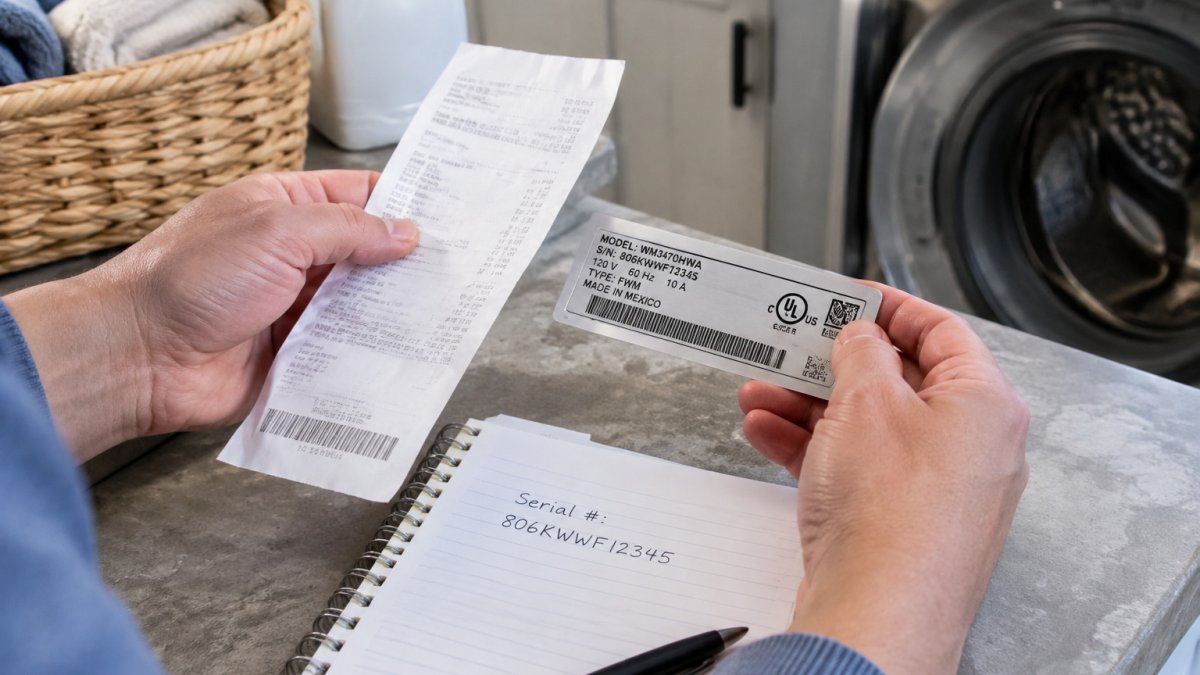
- Proof of purchase (receipt, invoice, or order confirmation showing the date)
- Model number (usually on a sticker inside the door or on the back)
- Serial number (often on the same label as the model number)
Keep copies of everything you send. Take photos of the data label before you call or submit a form, since labels can be hard to read later.
How to File an Appliance Warranty Claim Online, Step by Step
Many manufacturers and warranty administrators let you start a claim online, but first confirm which party administers your coverage, since filing through the wrong channel can delay a claim.
First, identify who administers your warranty
Use this decision path before you open a portal:
- Did you buy an extended protection plan or service contract? Check the plan documents, not the appliance manual. The administrator named there (often a third-party company, sometimes the retailer) handles the claim, even during the manufacturer's original term if the plan is primary. File with the administrator.
- No plan, and the appliance is inside the manufacturer's warranty period? File with the manufacturer. The warranty booklet or the model's support page lists the claims line and portal.
- No plan, and the manufacturer's term has expired, but you bought with a credit card that offers extended warranty or purchase protection? Contact the card issuer's benefits administrator. These claims usually require the original receipt, the manufacturer's warranty terms, and sometimes a repair estimate before any work is done.
- Retailer-specific coverage (installation warranty, delivery damage, or a store-brand protection plan)? File with the retailer. Delivery and installation damage is typically handled as a retailer claim, not a manufacturer defect claim, and mixing the two delays both.
Delivery damage is generally handled as a retailer claim rather than a manufacturer defect claim, so check with the retailer promptly. Report delivery or installation damage to the retailer immediately, in writing, before you troubleshoot anything. Follow the steps for post-delivery damage to document it properly.
File online, step by step
Once you know the right channel:
- Go to that party's support or warranty section and locate the claims or service-request form.
- Enter your model and serial number to confirm coverage and pull up the correct plan terms.
- Create an account or log in. Use an email address you check often so you do not miss claim updates.
- Select "file a claim" or "request service" and choose the symptom category closest to your problem.
- Describe the problem in plain language, include any error codes, and attach your photos or short video.
- Enter proof-of-purchase details, including the purchase date and the retailer.
- Review the address where the appliance is located. A wrong service address is a frequent cause of missed appointments.
- Submit and save the claim or reference number, plus a screenshot of the confirmation page.
Look for a confirmation email shortly after submitting. If it does not arrive, check spam, then call the support line with your reference number rather than submitting a duplicate claim. Duplicate claims can slow the original one.
Filing by phone when online filing isn't available
Some warranties and administrators require or work better with a phone call for complex issues.
Watch out: if a phone representative tells you to file online instead, ask for the exact URL and whether the phone call created a record.
Filing through the right channel depends on who administers your coverage, so this quick reference maps each situation to the party to contact.
| Coverage situation | Who to file with | Key requirement |
|---|---|---|
| Extended protection plan or service contract | The administrator named in the plan documents | Check plan documents, not the appliance manual |
| No plan, manufacturer term still active | The manufacturer | Warranty booklet or model support page lists the claims line |
| Manufacturer term expired, card offers extended warranty | Card issuer's benefits administrator | Usually needs original receipt, warranty terms, and sometimes a repair estimate |
| Installation or delivery damage | The retailer | Report immediately, in writing, before troubleshooting |
Troubleshooting Before You Submit: Checks That Can Save a Claim
Some problems have simple fixes. Trying these steps first may resolve the issue without a claim or service visit.
- Check the power. Make sure the appliance is plugged in and the outlet works. Test the outlet with another device.
- Check the circuit breaker. A tripped breaker can make an appliance look dead.
- Check the settings. A control lock, a delay start, or a wrong cycle can mimic a fault.
For example, if a dishwasher is leaking, first check whether the door seal is dirty or the spray arm is cracked. Fix a leaking dishwasher with a step-by-step guide to these checks.
If the problem remains after these checks, document it and move on to the claim. Save any error codes and the steps you already tried. Service technicians often ask about them.
Appliance Warranty Claim Status: What to Expect After Filing
After you submit a claim, the process usually moves through a predictable set of stages. Knowing the stages helps you tell the difference between a claim that is progressing slowly and one that has stalled and needs a push.
The typical stages after filing
- Intake and coverage verification. The administrator confirms your model, serial number, purchase date, and that the plan is active. This is where missing documentation surfaces. Missing documentation is often identified at this stage.
- Triage and authorization. The claim is routed to in-house diagnostics, a phone troubleshooting step, or an authorized service provider. Some issues are resolved by shipping a part; others require a technician visit.
- Scheduling. If a technician is needed, the provider contacts you to set an appointment. Scheduling availability varies by area and appliance type.
- Diagnosis and parts. The technician diagnoses the fault and orders parts if needed. Parts availability can be a source of delay, especially for less common models.
- Repair, replacement, or reimbursement. The claim closes with a completed repair, a replacement unit, or a reimbursement if you paid out of pocket under an approved process.
Claim review times and technician scheduling vary, and part orders can add time depending on availability. Ask the representative for a realistic estimate and a follow-up date, and write both down.
How to check status without losing time
- Log in to the claims portal and look up your reference number. Screenshot the status page each time, with the date visible.
- If the portal shows no update after the expected window, call the support line and ask specifically which stage the claim is in and what is blocking it.
- Keep your confirmation email and every reference number handy for each contact.
When a claim stalls: escalation steps
A claim that has not moved past the expected window needs a documented push, not another generic status check.
- Ask for the blocker in plain terms. "Is this waiting on parts, on authorization, or on scheduling?" The answer tells you who to press.
- Request a supervisor or case manager if the front-line representative cannot give a dated next step. Ask for the escalation to be noted on the claim.
- Put it in writing. Send a short email or use the portal's message feature summarizing the claim number, the date filed, what you were told, and what you are asking for. Written requests create a record that phone calls do not.
- Set a follow-up date and call on that date if you have not heard back. Keep a log with the date, time, representative name, and what was promised.
- Escalate to the administrator's complaint process if the claim remains stuck. Plan documents and administrator websites may describe a formal complaint or review channel; reference your prior contacts when using it.
Watch out: do not authorize a paid repair on your own and assume you will be reimbursed. Some plans require pre-authorization before work begins, and unauthorized repairs can lead to denied reimbursement requests. If you need the appliance working quickly, ask the administrator in writing whether a self-pay reimbursement is allowed for your situation before you hire anyone.
If the claim is denied
A denial is not always final. Ask for the specific reason in writing, compare it to your plan terms, and gather any missing proof, such as a clearer receipt or serial-number photo. If you believe the decision is wrong, request a supervisor or formal review and keep a written record of every contact. If the appliance is failing and the repair cost is high, replacement may make more sense than continuing to fight the claim; our guide on signs your refrigerator needs replacing can help you weigh that decision.
What to Do If Your Appliance Warranty Claim Is Denied
A denial is not always final. Start by asking for the specific reason in writing. Common reasons include an expired warranty, an exclusion, or missing documentation.
Next steps:
- Read the denial letter and compare the reason to your warranty terms.
- Gather any missing proof, such as a receipt or a clearer serial number photo.
- Ask for a supervisor or a formal review if you believe the decision was wrong.
- Keep a written record of every call, including the date, time, and representative name.
If the appliance is failing and repair costs are high, replacement may make more sense than fighting the claim. Our guide on signs your refrigerator needs replacing can help you decide.
Your Next Step: Register the Appliance and Keep Your Records Ready
Register each new appliance with the manufacturer as soon as you buy it. Registration confirms your coverage and makes future claims faster. For landlords, durable, easy-to-repair appliances for rentals make this record-keeping simpler across several units.
If you are buying a new appliance from Fast Appliances LLC, you can find models, specs, and order details on our website. Keep your order confirmation with your warranty records so you have proof of purchase ready when you need it.
Frequently Asked Questions
How long is an appliance under warranty?
Manufacturer warranty lengths vary by brand, model, and component, and extended protection plans may add coverage beyond the manufacturer's term. The exact terms depend on the brand and model, so check the warranty booklet or the manufacturer's website for the specific length of coverage on your appliance.
How do I file an appliance warranty claim online?
Start on the manufacturer's or warranty administrator's claims page, then sign in or create an account. Enter the model number and serial number, describe the problem clearly, upload photos if requested, and provide your proof of purchase. Submit the claim, note the reference number, and keep a copy of the confirmation. Many providers also offer phone filing if the online form won't accept your information.
What can I do if a company won't honor their warranty?
First, request the denial reason in writing and compare it against the coverage terms in your warranty document. If the denial seems incorrect, ask for a supervisor or escalation through the company's customer relations team, and reference the specific coverage language. If that fails, consider contacting a consumer protection agency, and keep all correspondence, receipts, and photos as documentation.
Should I repair an appliance before the warranty claim is approved?
No. Arranging your own repair before the claim is approved can void coverage, because the manufacturer usually requires its authorized technician to diagnose the problem. Unless the appliance poses a safety hazard, such as a gas leak or electrical burning smell, wait for the claim decision. If you must take temporary action for safety reasons, document the problem with photos and notes first.